Aspect ratio and resolution are among the first decisions when preparing a Digital Cinema Package (DCP). Get them wrong and your film may be letterboxed, cropped or rejected at QC.
What are flat and scope?
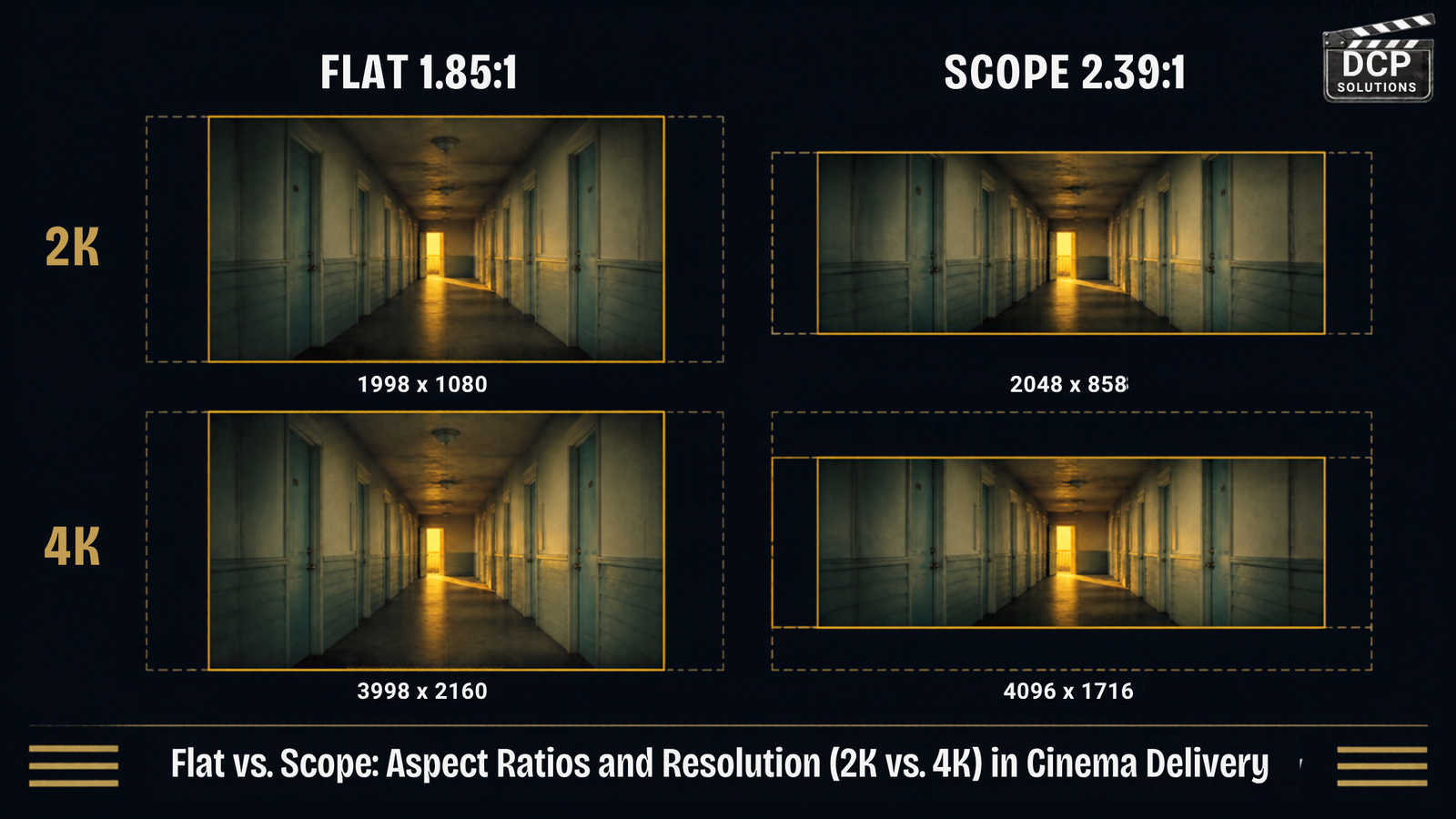
Cinema screens use two standard formats.
- Flat (1.85:1): a slightly wider-than-HD frame, common for dramas, documentaries and most festival films.
- Scope (2.39:1): an ultra-wide, cinematic frame suited to epics, thrillers and spectacle.
Both sit inside a fixed DCP container, so the picture is never stretched. Black bars fill any unused space.
2K vs. 4K: container sizes
| Format | 2K Container | 4K Container |
| Flat (1.85:1) | 1998 x 1080 | 3996 x 2160 |
| Scope (2.39:1) | 2048 x 858 | 4096 x 1716 |
Your picture sits inside a 2048 x 1080 (2K) or 4096 x 2160 (4K) container, sized to your aspect ratio.
What about 16:9 and other ratios?
A 16:9 (1.78:1) film fits inside a Flat container with thin black bars at the sides (pillarboxing). Other ratios, such as 4:3 or 2:1, are placed in Flat or Scope the same way. Your DCP creator will advise whether to letterbox (keep the full frame, with bars) or crop (fill the container, losing some image). Never crop without checking your composition first.
Should you choose 2K or 4K?
2K is the right choice for most projects. It is universally supported, produces smaller files and plays on virtually every cinema server, with no visible loss of quality on standard screens.
Choose 4K when:
- your film was shot, graded and finished in 4K or higher
- a festival or distributor requests it
- it will screen on large premium screens where the extra detail shows.
4K DCPs are larger, slower to create and transfer, and not every venue can play them, whereas most 4K projectors play 2K perfectly. Never upscale an HD master to 4K: it adds file size, not detail.
How to choose the right format
- Check your source. Identify your master’s native resolution and aspect ratio, and pick the container that preserves your framing.
- Read the delivery specs. Festivals and distributors often state their requirements.
- Consider the venue. If you are unsure of the screening setup, choose 2K.
- Ask a professional. A DCP specialist can prevent costly errors before delivery.
- Test before the event. A test screening catches problems before your audience does.
Frequently asked questions
Flat is 1.85:1, a taller frame suited to dramas and documentaries. Scope is a wider 2.39:1, an ultra-wide look favoured for thrillers and epics.
Choose 2K for most projects: it plays on virtually every cinema server and creates smaller files. Choose 4K only if your film was finished in 4K or a festival or distributor requests it.
Yes. It sits inside a Flat container with thin black bars at the sides (pillarboxing), and the picture is not stretched.
Many modern cinemas can, but not every venue supports it. Most 4K projectors play 2K perfectly, so 2K is safer if you are unsure.
No. Upscaling adds no real detail and makes the file larger. Match your DCP resolution to your master’s native resolution.
Final thoughts
Flat and Scope define how your film is framed; 2K and 4K define how much detail it carries. For most filmmakers, a well-prepared 2K DCP in the correct container delivers excellent results. Unsure what suits your project? DCP-Solutions can review your files and create a cinema-ready package that plays correctly first time. Contact us for a quote.
Not sure which format your festival or cinema needs? Read our guide to DCP mastering explained, see our DCP mastering services, or contact our team for a free format check.